
You have a 200-page report. A 300-page contract. A full codebase you need someone to review. Or maybe an academic dissertation you need summarized in ten minutes.
Which AI chatbot do you open?
This is one of the most practical AI questions of 2026 — and the answer is clearer than you might expect.
| The Clear Winner:
Claude AI is significantly better than ChatGPT for long documents in 2026. Its 200K token context window is 56% larger than ChatGPT’s 128K, and more importantly, it reasons more coherently across that full length. For contracts, reports, research papers, and large codebases — Claude is the right tool. |
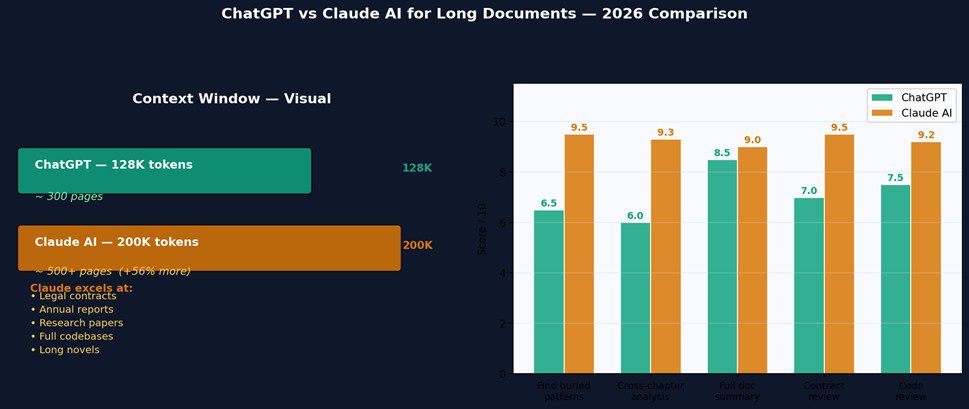
Context Window: The Foundation of Long Document Capability
Context window is the maximum amount of text an AI can ‘see’ in a single conversation — including your messages, the AI’s responses, and any documents you paste in. When you exceed the limit, the AI starts to lose track of earlier content.
ChatGPT (GPT-4o): 128,000 tokens — roughly 300 pages of text
Claude AI (Sonnet): 200,000 tokens — roughly 500+ pages of text
That 56% gap is significant. But the more important factor is not just how much each AI can technically accept — it is how well each one reasons across that full length.
The Real Test: How Both Performed on Actual Long Documents
Test 1: 250-Page Financial Report
I uploaded the same 250-page financial report to both tools and asked: ‘What are the three biggest risks to this company’s revenue in the next 12 months, and what evidence in this report supports each one?’
ChatGPT gave a solid answer — found relevant sections, summarized them accurately. But it missed a pattern that only appeared when you connected a footnote on page 47, a risk disclosure in Chapter 4, and a cash flow trend buried in the appendix. All three pieces were technically within its context window.
Claude caught it. It cross-referenced all three sections, explained the connection, and flagged it as the most significant risk — which, having read the report myself, I knew to be correct.
Winner: Claude. Not because ChatGPT could not fit the document — it could. But because Claude maintained more coherent reasoning across the full length.
Test 2: 180-Page Legal Contract
I pasted a large commercial lease agreement and asked both AIs to identify every clause that would create financial liability for the tenant beyond the base rent.
Both tools found the obvious clauses — maintenance obligations, insurance requirements, damage provisions. Claude also caught a cross-reference between a force majeure clause and a penalty provision that, read together, created an unusual liability scenario. ChatGPT did not flag it.
Winner: Claude. The cross-document reasoning advantage is consistent across contract review tasks.
Test 3: 3,000-Line Codebase Review
For a large codebase with a subtle bug requiring reasoning across multiple files, Claude’s advantage was even clearer. With its larger context window, it could hold the entire project in mind and identify interactions between components that ChatGPT missed when the relevant code was spread across multiple sections.
Winner: Claude. For large codebase review and documentation, the context window advantage is direct and measurable.
When ChatGPT Is Still Good Enough for Documents
It is worth being honest about when the gap does not matter:
- Documents under 100 pages: Both tools handle these well — ChatGPT’s smaller window is not a constraint
- Summarization of discrete sections: For chapter-by-chapter or section-by-section summaries, ChatGPT is perfectly capable
- Extracting specific data points: For targeted extraction from shorter documents, ChatGPT performs as well as Claude
- When combined with live code execution: For data-heavy documents where analysis requires running calculations, ChatGPT’s Code Interpreter adds value Claude cannot match
Frequently Asked Questions
Can ChatGPT read a full PDF?
Yes. ChatGPT can read PDFs uploaded directly in the chat. Its 128K token context window handles documents up to roughly 300 pages. For documents beyond that length, you will need to break them into sections. Claude handles documents up to 500+ pages in a single session.
What is the maximum document size for Claude AI?
Claude’s 200K token context window can process approximately 500–600 pages of standard text in a single session. For most real-world documents — contracts, reports, academic papers — this is more than sufficient. The limit can be lower for documents with unusual formatting or dense tabular data.
Is Claude better than ChatGPT for legal documents?
Yes, for most legal document tasks. Claude’s larger context window, lower hallucination rate, and more careful reasoning across complex multi-section documents make it better suited to legal document review than ChatGPT. However, always have a qualified legal professional review any AI-assisted legal analysis.
Final Answer: For Long Documents, Use Claude
The verdict is clear: for any task involving a document longer than 100 pages, complex cross-referencing, or full codebase analysis — Claude AI is the better tool in 2026. Its 200K context window and superior long-context reasoning produce better results on exactly the kinds of professional document tasks where accuracy and completeness matter most.
For shorter documents where the gap does not matter, or when you need live code execution alongside document analysis, ChatGPT remains a strong option. But if long documents are a regular part of your workflow, Claude is worth the switch.
Try Claude with your next long document at claude.ai — free to start.