

Learning how to use ChatGPT for free in 2026 is one of the most useful things you can do right now — OpenAI has made GPT-4o, its most powerful model, available on the free plan, and millions of people are using it daily for writing, research, coding, studying, and much more without spending a penny.
This complete guide covers exactly what the ChatGPT free plan includes, how to access GPT-4o for free, the best ways to use it, smart tips for getting better results, and honest answers to the most common questions beginners ask in 2026.
| Last Updated: March 2026 GPT-4o became available on the free plan in May 2024. This guide reflects the current state of the free tier as of March 2026. |
How to Use ChatGPT for Free 2026: What the Free Plan Includes
The ChatGPT free plan in 2026 is genuinely generous — far more capable than it was in 2023. Here is exactly what you get at no cost:
- GPT-4o model access — limited to approximately 10–20 messages every 3 hours, then it resets
- GPT-4o mini — unlimited messages on the smaller, faster model (great for most everyday tasks)
- Web browsing — real-time internet search is included on the free plan
- Image generation — limited DALL-E image creation per day
- Memory — ChatGPT can remember your preferences across conversations
- Mobile app — full-featured free app for iOS and Android
- Custom GPTs — access to thousands of community-built AI tools
For the full free-vs-paid breakdown for every major AI tool, see our Best AI Chatbots 2026 guide.

ChatGPT free plan vs ChatGPT Plus 2026 — full feature comparison side by side.
How to Use ChatGPT for Free 2026: Step-by-Step Setup
Getting started with the ChatGPT free plan takes under 2 minutes. Here is the exact process:
Step 1: Visit chat.openai.com in any browser — Chrome, Safari, Firefox, or Edge.
Step 2: Click ‘Sign up’ and create a free account using email, Google, Microsoft, or Apple sign-in.
Step 3: When prompted to upgrade, click ‘Stay on free plan’ — no payment details needed.
Step 4: Type your first message in the chat bar. ChatGPT responds instantly.
Step 5: Enable web browsing by clicking the globe icon in the message bar for real-time search.
Step 6: Star important conversations in the left sidebar to save them for later.
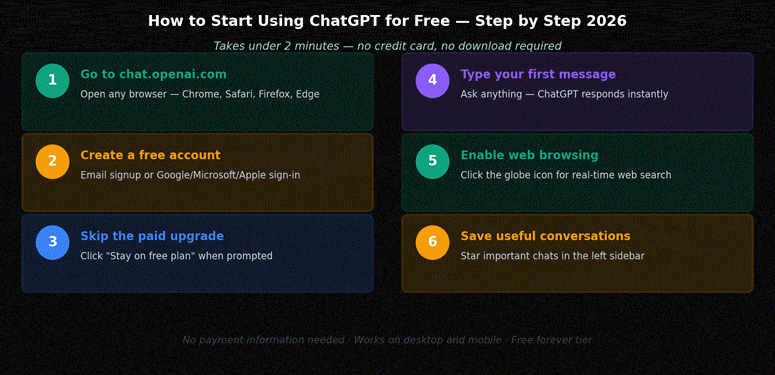
How to start using ChatGPT for free in 2026 — step-by-step guide, takes under 2 minutes.
Can I Use ChatGPT Without Signing Up?
Yes — OpenAI lets you try ChatGPT instantly at chat.openai.com without creating an account. You get GPT-4o mini access and basic chat functionality without any registration. However, chat history is not saved and you do not get access to GPT-4o, memory, or custom GPTs.
For most people, creating a free account (30 seconds, no credit card) is worth it to unlock the full free tier.
Full details: Can I use ChatGPT without signing up?
Best Ways to Use Free ChatGPT in 2026
Knowing how to use ChatGPT for free in 2026 means knowing what it excels at. Here are the top 10 use cases where the free plan delivers real value:
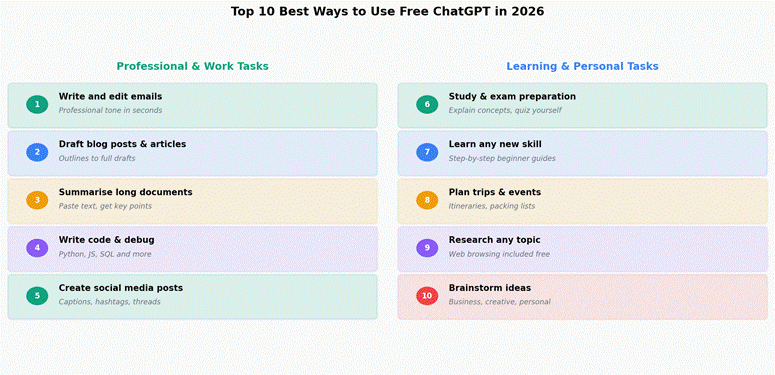
Top 10 best ways to use free ChatGPT in 2026 — work and personal use cases.
Work & Professional Tasks
1. Writing and editing emails: Paste a rough note and ask ChatGPT to turn it into a professional email. Takes seconds.
2. Drafting blog posts and articles: Give it a topic and target audience — ChatGPT produces full outlines and drafts. For AI writing tools specifically built for bloggers, see our AI writing tools for bloggers guide.
3. Summarising long documents: Paste a long report or article and ask for a 5-point summary. Works brilliantly on the free plan.
4. Writing and debugging code: Python, JavaScript, SQL, HTML — GPT-4o is a strong coding assistant even on the free tier.
5. Creating social media content: Ask for Instagram captions, LinkedIn posts, tweet threads — with hashtags and tone matched to your brand.
Learning & Personal Use
6. Study and exam prep: ‘Explain the French Revolution like I’m a student who needs to pass an exam tomorrow’ — one of the most powerful free uses.
7. Learning new skills: ‘Give me a 4-week self-study plan to learn Python from scratch’ — ChatGPT creates personalised learning roadmaps.
8. Travel planning: Full itineraries, packing lists, budget breakdowns — free ChatGPT + web browsing is a surprisingly capable travel planner.
9. Research on any topic: With web browsing enabled, ChatGPT can pull current information. Good for journalism, academic research, and competitive analysis.
10. Business brainstorming: Product names, marketing ideas, business plan outlines — ChatGPT is an always-available brainstorming partner.
Interested in monetising these skills? See our guide to how to make money with AI.
Best Prompts for Free ChatGPT Users in 2026
Getting better results from the free plan is about prompt quality. Here are the most effective prompt patterns for beginners:
- Role-based: ‘Act as an expert [role] and help me with [task]’
- Specificity: ‘Write a [length] [format] about [topic] for [audience] in a [tone] tone’
- Iteration: ‘Make it more concise / formal / creative / detailed’
- Explanation: ‘Explain [concept] like I’m a complete beginner’
- Structure: ‘Give me this as a numbered list / table / step-by-step guide’
For advanced prompting techniques, see our complete Prompt Engineering Guide — covers the best structures for every use case.
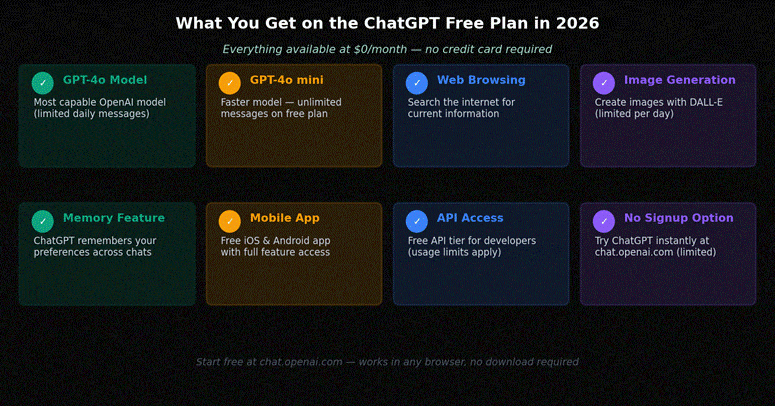
Full feature breakdown of the ChatGPT free plan in 2026 — all available at $0/month.
How to Get GPT-4o on the Free Plan
GPT-4o is available on the ChatGPT free plan — you do not need ChatGPT Plus to access it. By default, when you open chat.openai.com, GPT-4o is the selected model. If you see ‘GPT-4o mini’ selected instead, click the model dropdown and switch to GPT-4o manually.
The free plan GPT-4o limit resets approximately every 3 hours — so space out your complex tasks and use GPT-4o mini for simpler ones to conserve your daily allowance.
Full guide: How to get ChatGPT 4 for free in 2026
ChatGPT Free Plan Limits — What to Expect
The free plan is genuinely capable, but it does have limits:
- GPT-4o: approximately 10–20 messages per 3-hour window (OpenAI has not published exact numbers)
- GPT-4o mini: unlimited messages — great for most everyday writing and research
- Image generation: limited daily DALL-E usage
- File uploads: limited per day
Smart tip: use GPT-4o for complex, multi-step tasks and GPT-4o mini for quick questions and simple edits. This stretches your free GPT-4o allowance considerably.
Full limits breakdown: ChatGPT free plan limits 2026
Free ChatGPT Tips for Getting Better Results
- Save your best prompts in a notes app — build a personal prompt library and reuse what works
- Use the web browsing icon (🌐) for any question about current events, prices, or recent news
- Ask for explanations of its reasoning — ‘Why did you write it that way?’ helps you catch errors
- Use follow-up messages to improve outputs — ‘Make it shorter’, ‘add more examples’, ‘change the tone’
- Enable memory — ChatGPT can remember your job title, writing style preferences, and recurring tasks
For 8 more beginner tips, read our best way to use ChatGPT for beginners guide. For advanced techniques, visit our Prompt Engineering Guide.
Frequently Asked Questions
Is ChatGPT completely free to use in 2026?
Yes — ChatGPT has a permanent free tier at chat.openai.com. GPT-4o is available free with a daily message cap; GPT-4o mini is unlimited on the free plan. No credit card is ever required.
What is included in the free ChatGPT plan?
The free plan includes GPT-4o (limited), GPT-4o mini (unlimited), web browsing, limited image generation, memory, mobile app access, and access to custom GPTs.
How do I get ChatGPT 4 for free?
Visit chat.openai.com, create a free account, and GPT-4o is the default model. Click the model selector to switch between GPT-4o and GPT-4o mini at any time.
Can I use ChatGPT without signing up?
Yes — you can try ChatGPT without an account at chat.openai.com by clicking ‘Try ChatGPT’. You get GPT-4o mini access but no chat history, memory, or GPT-4o.
What are the limits of free ChatGPT?
Free GPT-4o messages reset approximately every 3 hours — around 10–20 messages per window. GPT-4o mini is unlimited. Image generation and file uploads are limited daily.
What is the best way to use ChatGPT for beginners?
Start with specific prompts: tell ChatGPT your role, task, and desired format. Use follow-up messages to refine outputs. Save useful prompts. Use web browsing for current information.
How many messages can I send on free ChatGPT per day?
GPT-4o mini is unlimited. GPT-4o is approximately 10–20 messages per 3-hour window. OpenAI has not published exact numbers — limits can vary with server demand.
Is ChatGPT Plus Worth It?
For most casual users, the free plan is more than sufficient. ChatGPT Plus at $20/month is worth it if you need unlimited GPT-4o messages throughout the day, advanced data analysis with live code execution, or DALL-E 3 image generation without limits.
For a full comparison of all AI chatbot paid plans, see our Best AI Chatbots 2026 guide. To compare ChatGPT against Claude AI specifically, read our ChatGPT vs Claude AI 2026 comparison.
Final Verdict: How to Use ChatGPT for Free in 2026
Knowing how to use ChatGPT for free in 2026 is a genuinely useful skill — OpenAI has made the free tier more capable than ever with GPT-4o access, web browsing, and mobile apps all included at $0. For most everyday tasks — writing, research, learning, coding, and planning — the free plan delivers everything you need.
Start at chat.openai.com, create your free account in under 2 minutes, and use the tips in this guide to get the most out of every session.